## TLDR;
Built a local AI-based job application tracker using n8n + LLMs + Google Sheets.
- Fetches emails daily
- Filters only job-related ones
- Uses LLMs to classify and extract relevant data
- Appends results into a Google Sheet

All done locally — private, automated, and efficient.
Table of contents
Open Table of contents
Problem
What is the issue I had, and what was I trying to achieve then. My problem is that I put in a lot of job applications day in, day out, but I never had a way to properly track them. And I didn’t want to manually create an Excel/Sheets/Airtable entry every time I applied.
P.S. - As the complete setup is local to your system/network. Hence more private, preserving data privacy too.
So, what did I do then? I built an AI automation workflow that runs in the background — quietly, without interrupting my flow — and logs my job applications in Google Sheets.
Solution
Prerequisites
- Local n8n instance deployed via Docker (since the cloud version has only a 14-day trial and why share your private info anyway?)
- A local LLM running in LM Studio (or other) with exposed API. You can use OpenAI API too, if privacy isn’t a concern.
- Google Cloud account with Gmail, Drive, and Sheets APIs enabled, and OAuth credentials configured in n8n.
- Local LLM API connected in n8n as a credentialed resource.
- Wanna know about the setup I had for this? Check it out at the end.
Workflow
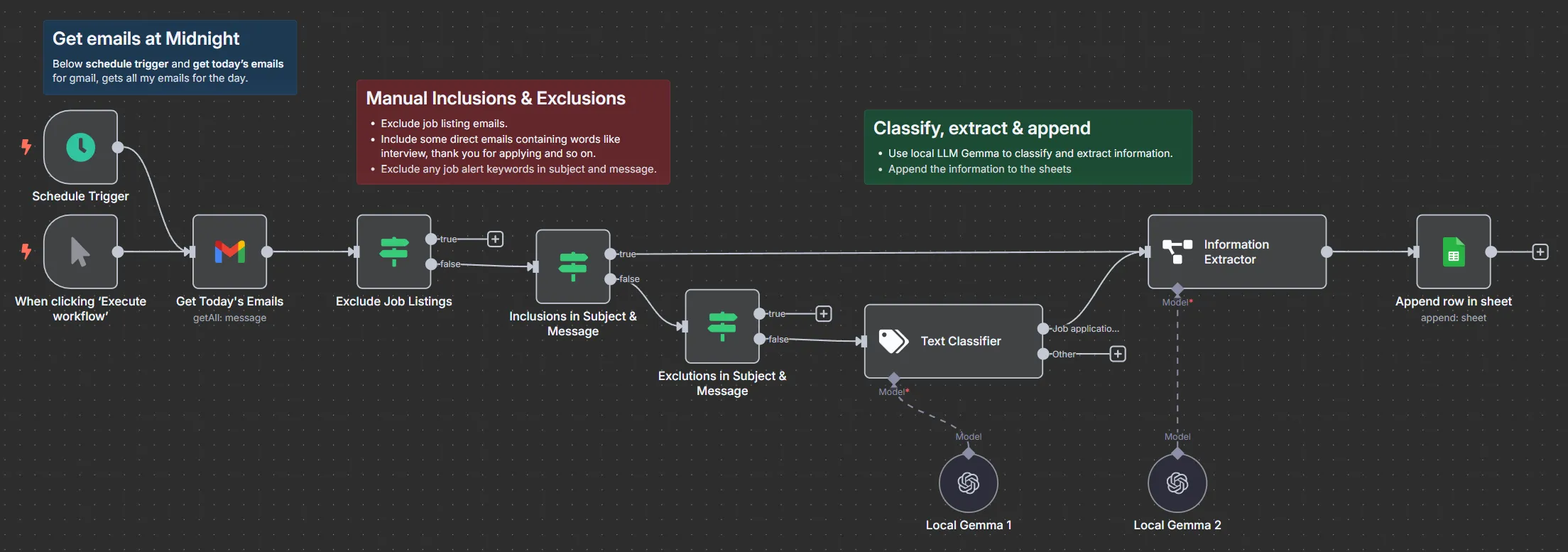
How It Works
- Triggering the Flow: The automation runs every midnight via a schedule trigger, or manually via a button if needed.
- Fetching Emails: All emails from that day are fetched using the Gmail integration.
- Filtering:
- Job listing platforms are excluded to avoid spammy alerts.
- Subject/message content is checked for inclusion or exclusion keywords like “interview”, “thank you”, or “job alert”.
- Text Classification: Emails that pass filtering are classified using a local LLM (Gemma via LM Studio) to determine if they relate to a job application.
- Information Extraction: The LLM is used again to extract relevant details such as company name, job title, application status, and so on.
- Appending to Sheets: If classified as a job application, the extracted data is appended as a new row in the connected Google Sheet.
All of this runs quietly and locally, and the sheet updates itself daily — no manual input required.
Output
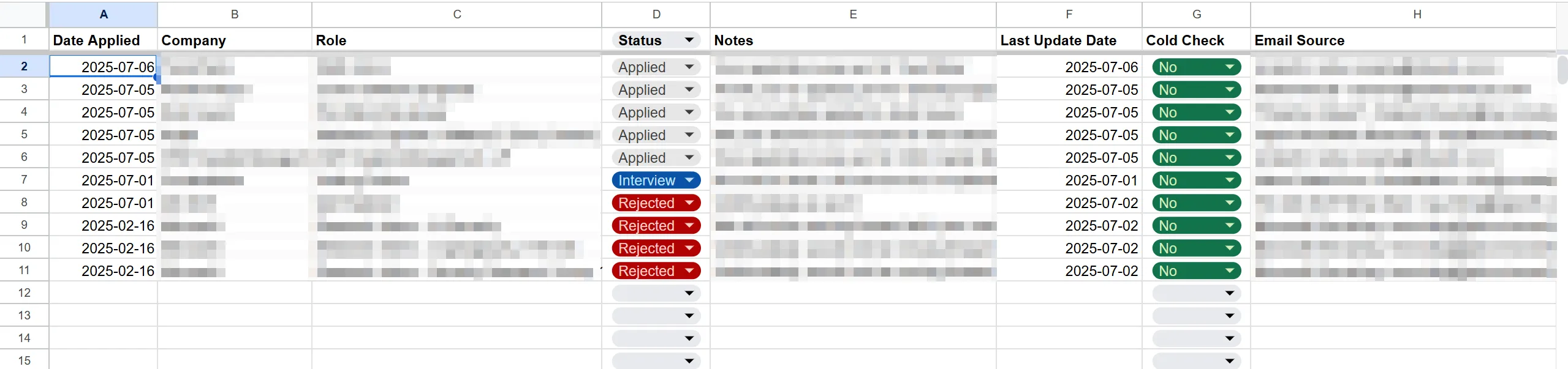 Just blurred out the entries, but they do exist — don’t worry about that 😉.
With the entries, now I can do even more things like how many applications that I submitted in a day, in a month, and many more statistics.
Finale
Overall, this workflow works great for capturing application entries. I just do a quick review weekly to correct any occasional errors. Below are some limitations,
- Simplified email content sometimes causes the LLM to misclassify or miss context.
- The system doesn’t track duplicates or updates yet, as there’s no stable unique key per row. That’s a work-in-progress.
My Setup
- Had a
n8n dockercontainer with docker volume created and complete n8n setup done - running on myhomelab's ubuntu server. - Probably thinking of moving this container to my
kubernetes clusterwith a separate namespace and PVC for its data. - Btw, for local LLM inference, I’m using LM Studio server for now with Google’s
Gemma 13bparameter model on myRTX 2060 MAX-Qlaptop. - Really, a laptop? I’m broke and job hunting, not want to spend a dime more than what’s absolutely necessary.